LOCAL DOES NOT ALWAYS ME OFFLINE
Can You Make a TikTok Transcript Offline?
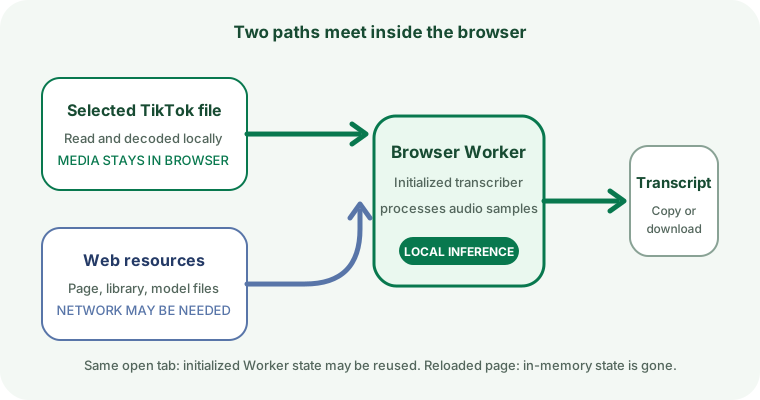
Your selected TikTok file stays in the browser, but the current page still loads transcription code and speech-model resources from the web. A later run may reuse resources already available to the browser, but this site does not guarantee offline startup after a refresh or cache clear.
Open the TikTok transcript tool
What stays local
The file you choose is read with the browser File API, decoded into audio, and passed as samples to a browser Worker. The current code does not send that selected media to a Clip to Text transcription server. TXT, SRT, and VTT downloads are also created with browser Blob URLs.
What still comes from the web
Page resources
The browser must load this page, its script, and its stylesheet unless usable copies are already cached.
Transcription library
The browser Worker dynamically imports its transcription library from a web CDN when the transcriber is first prepared.
Speech-model resources
The first preparation step requests model files and reports downloaded bytes when totals are available.
Selected media and inference
After decoding and setup, audio samples are processed by the Worker in the visitor's browser.
What the same open tab can reuse
The Worker stores its initialized transcriber in memory. After setup succeeds, another run in that same open page can reuse that in-memory instance instead of creating it again. Closing or reloading the tab removes that in-memory state.
The browser may also reuse cached files, but cache availability is controlled by the browser and its storage state. Private browsing, storage cleanup, browser updates, or an evicted cache can change what is available. For that reason, this page does not label the tool as an offline app.
How to check before you lose connectivity
- While online, open the tool and complete one short authorized test file.
- Keep the same tab open. A completed run confirms that the Worker and model were initialized for that page session.
- If offline use matters, test a second short file in that same tab after disconnecting. Treat the observed result as specific to that browser session, not as a permanent promise.
- Save any finished transcript before closing or refreshing the page.
How to read a stalled offline attempt
If the page cannot load, the Worker cannot import its library, or model preparation cannot finish, no transcript will be produced. A model-download status with no progress is not evidence that the selected video was uploaded; it identifies the separate resource-loading stage. Use the visible error or status label as the evidence for that run.
Offline TikTok transcript questions
Does browser-local transcription mean the entire tool is offline?
No. The selected media and inference can stay in the browser while the page still depends on web-delivered code and model resources.
Will the speech model always remain cached?
No guarantee is published here. The browser may reuse cached resources when they are available, but storage policies and user actions can remove them.
Can I refresh the page after going offline?
Do not depend on it. Reloading discards the in-memory transcriber, and a new page load may need resources that are not available offline.
To separate model loading from transcript progress, read what each status message means. For the selected-file path, see where your TikTok file is processed.