FILE HANDLING, EXPLAINED
Does a TikTok Transcript Tool Upload Your Video?
For Clip to Text’s current TikTok tool, the selected video or audio file is read and decoded in your browser, then its audio samples are passed to a browser worker. The page’s transcription code does not upload that selected media file to Clip to Text. It does download speech-model code and model files from configured external sources, so local transcription is not the same as offline transcription.
Open the TikTok transcript tool
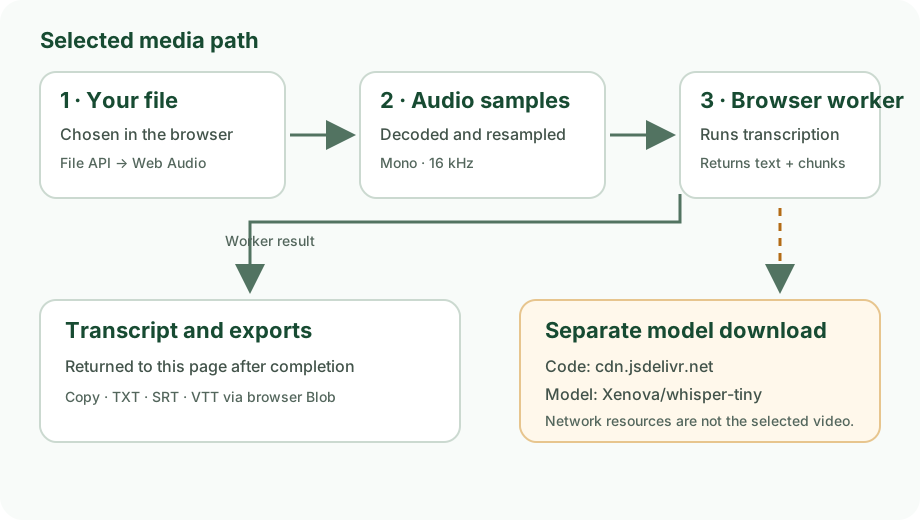
What happens to the selected file
- The browser reads the file. The page calls
arrayBuffer()on the file selected in the picker and decodes it with the browser’s Web Audio API. - The page prepares audio samples. It renders a mono, 16 kHz audio buffer in an
OfflineAudioContext. The code then transfers that buffer to a browserWorker. - The worker runs transcription locally. The worker receives the audio samples and language choice, runs the transcription pipeline, then returns the completed text and timestamp chunks to the page.
- Exports are created in the browser. Copy, TXT, SRT, and VTT output is assembled in the page; downloads use a browser-created
BlobURL.
The model still needs network access
The worker dynamically imports Transformers.js from jsDelivr and initializes the Xenova/whisper-tiny speech-recognition model. Those configured code and model resources are fetched by the browser. A first run can therefore download model resources even though the selected video is not sent to the site for transcription.
The progress display distinguishes model-resource loading from transcription. A received-byte count, when available, describes a resource download; it is not a count of uploaded video bytes or completed words.
How to check the distinction yourself
- Open the TikTok tool in Chrome and open Developer Tools.
- Select the Network panel, clear its request list, then choose a local media file and start transcription.
- Inspect the request host and initiator. The application imports its transcription library from
cdn.jsdelivr.netand initializes the model IDXenova/whisper-tiny; these code and model resources are separate from the selected file. - In this code path, the selected media is read through browser file and audio APIs and its decoded samples are passed to the worker. The page contains no app-level media-upload request to the Clip to Text origin.
Evidence scope: this explanation is traced from the current site files, especially app.js. It is not a packet capture of every browser, extension, network proxy, or device setting.
Frequently asked questions
Can I transcribe without an internet connection?
Do not assume that. The browser needs to load the configured transcription code and model resources. This page describes local handling of the selected media, not an offline guarantee.
Does the model download contain my video?
No. In the application code, the model is selected separately from the file input. The browser fetches model resources and passes decoded audio samples to its worker.
Can I paste a TikTok URL instead?
No. The current tool asks you to save a video or audio file on your device and select it in the browser.
For the tool’s input and output details, return to the TikTok transcript page.